
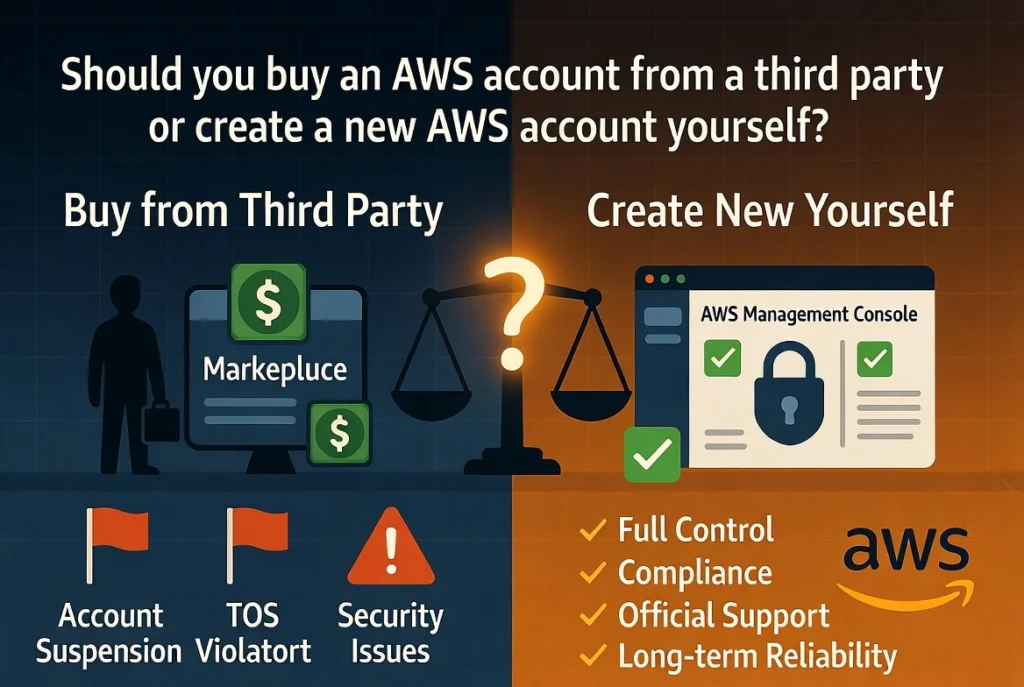
Buying an existing account may appear faster, especially when a seller advertises an “aged,” “verified,” or “high-limit” AWS account. However, the short-term convenience can introduce serious risks related to account recovery, billing, security, compliance, data privacy, and long-term ownership.
Creating a new account requires registration and verification, but it normally gives you direct control over the root email, payment method, contact information, security configuration, and account recovery process.
This guide compares buying an AWS account with creating a new AWS account so that you can choose the safer and more suitable option for your project or business.
What Does Buying an AWS Account Mean?
Buying an AWS account usually means obtaining access to an account that was originally registered by another person, company, agency, or reseller.
The seller may provide some combination of the following:
- Root user email and password
- AWS Management Console access
- An IAM user or administrator role
- Access keys
- Billing information
- A virtual payment method
- An email account connected to AWS
- An account with previous usage history
- Existing service quotas or resources
Not every AWS account sale is the same. A formal corporate account assignment during a merger, acquisition, restructuring, or authorized partner arrangement is very different from buying login credentials from an unknown seller.
AWS publishes specific requirements for formal account assignments. These requirements address matters such as outstanding charges, support plans, discounts, AWS Artifact agreements, regulated data, service resale, and pricing commitments. A resale-related transfer may also require the receiving party to be authorized by AWS. e, receiving a username and password should not automatically be treated as receiving clear, permanent, and compliant ownership of an AWS account.
What Does Creating a New AWS Account Mean?
Creating a new AWS account means registering directly with AWS using information that you or your business controls.
During registration, you generally provide:
- An email address
- A secure password
- Contact information
- A valid payment method
- Phone or identity verification information
- A selected AWS account plan
AWS currently requires a valid payment method for both its Free and Paid account plans. Eligible new customers may receive up to $200 in AWS credits and access to more than 30 services with ongoing monthly free usage limits. The Free account plan is designed for experimentation and proof-of-concept work for up to six months or until the available credits are used. register the account yourself, you control its identity, recovery channels, security settings, and billing relationship from the beginning.
Buy AWS Account vs. Create a New AWS Account: Quick Comparison
| Comparison Factor | Buying an Existing AWS Account | Creating a New AWS Account |
|---|---|---|
| Initial setup speed | May appear faster | Requires registration and verification |
| Root ownership | May remain connected to the seller | Controlled by you or your business |
| Recovery security | Seller may retain recovery access | You control the email and phone |
| Billing history | May contain unknown charges or commitments | Starts with a clean billing history |
| Free Tier eligibility | May already be used or unavailable | Eligible new customers may receive current offers |
| Compliance | Transfer may require formal conditions | Direct registration is straightforward |
| Account history | May contain unknown activity | Starts clean |
| Data privacy | Previous users may have had access | Access begins under your control |
| Long-term reliability | Depends on seller and transfer quality | Generally more reliable |
| Best for most users | No | Yes |
Ownership and Account Recovery
Ownership is one of the biggest differences between buying an AWS account and creating a new one.
The root user is the most powerful identity in an AWS account. It has complete access to the account’s resources, billing information, security settings, and administrative functions. AWS strongly recommends securing root credentials and avoiding root-user access for normal daily work. create an AWS account yourself, the root email address, password, contact number, and payment method belong to you or your company.
When you buy an existing account, the original owner may still control one or more recovery channels. For example, the seller may retain access to:
- The original email inbox
- The registered phone number
- A previously configured MFA device
- The payment instrument
- Company documents used during verification
- Support correspondence
- Other administrative identities
AWS explains that access to the root email and registered phone number can be important when recovering root credentials or an MFA device. This means changing the visible password may not be enough if the original seller still controls an underlying recovery method. ult, a purchased account can create a long-term ownership dispute. Even after you deploy applications and store data, the original registrant may potentially attempt to recover access.
Security Risks of Buying an AWS Account
Security should be a major consideration before purchasing any cloud account.
An unknown AWS account may contain:
- Old IAM users
- Unrecognized administrator roles
- Active access keys
- Cross-account permissions
- Unsecured storage buckets
- Existing API credentials
- Automation created by the previous owner
- CloudTrail or security configurations you do not understand
- Third-party integrations
- Previously compromised credentials
A seller could remove visible users while retaining another method of access. Discovering every persistent permission, trust relationship, key, role, application secret, and integration can require a complete cloud security audit.
AWS recommends using temporary credentials where possible, limiting the use of long-term IAM credentials, enabling MFA for root access, and avoiding root access keys. It also recommends creating an administrative identity for regular tasks instead of using the root user. created account lets you apply these practices from the beginning. You can design the access structure yourself rather than attempting to identify what a previous owner configured.
Compliance and AWS Account Transfers
It is important to distinguish between a formal account assignment and an informal account sale.
AWS’s published account-assignment requirements show that transferring an account can involve more than changing login credentials. Depending on the account, the parties may need to address:
- Outstanding fees
- Enterprise Support
- Discount agreements
- AWS Artifact agreements
- Protected health information
- Government-cloud eligibility
- Service resale authorization
- Pricing commitments
- AWS Organizations relationships
AWS also states that an assignment must not be used to arbitrage, avoid, or profit from pricing commitments. When an account remains associated with service resale, the receiving party may need appropriate AWS authorization. e, you should not assume that every marketplace seller offering a “verified AWS account” is completing a recognized account assignment.
For ordinary developers, freelancers, students, startups, and small businesses, creating a new AWS account is usually much simpler than determining whether a third-party transfer satisfies all applicable requirements.
Billing and Financial Liability
Cloud accounts can generate significant charges when resources are misconfigured, compromised, or left running.
A purchased AWS account may already contain:
- Active EC2 instances
- Stored snapshots
- Elastic IP addresses
- Databases
- Marketplace subscriptions
- Reserved capacity
- Savings commitments
- Support-plan charges
- Data-transfer usage
- Unpaid invoices
- Connected organizational billing
Even when the seller claims that the account is empty, you may not know its complete billing history or contractual commitments.
A new account gives you a clean starting point. You can review each service before activation, create budgets, configure billing alerts, restrict permissions, and monitor usage from the first day.
AWS’s Free account plan is intended to prevent charges during its initial period until the user upgrades, subject to plan conditions and available credits. The Paid account plan uses standard pay-as-you-go billing after credits or eligible free usage are exhausted. ss of the selected plan, users should monitor costs carefully. AWS Free Tier does not mean that every AWS service or every amount of usage is permanently free.
Free Tier and Promotional Credit Considerations
Some people consider buying an AWS account because they believe it includes unused credits or Free Tier benefits.
This can be misleading.
AWS states that its current Free Tier credits are intended for eligible new customers. Credits cannot be transferred between AWS accounts. An account may also become ineligible for Free Tier credits when it joins or creates an AWS Organization, and the Free account plan may then be upgraded automatically to a paid plan. urchase an existing account, you may discover that:
- Its credits have already been spent
- Its Free Tier period has expired
- It is not considered a new-customer account
- It previously belonged to an AWS Organization
- It is already on a paid plan
- Certain services are not eligible for credits
- Promotional credits are restricted or non-transferable
Creating a new account directly with AWS makes it easier to see which offers apply to you. You can review the credit balance, expiration information, plan type, and eligible services in your own billing console.
Does an Aged AWS Account Provide Better Limits?
Third-party sellers sometimes advertise aged AWS accounts as having better trust, higher limits, or fewer restrictions.
However, purchasing an older account does not automatically guarantee approval for a specific service, quota, region, workload, or sending limit. An account’s age alone does not establish that a new owner is authorized to use it for a different business model.
Service availability may depend on many factors, including:
- Region
- Account history
- Requested quota
- Payment status
- Workload details
- Security configuration
- Verification requirements
- Applicable AWS policies
- Service-specific review processes
If your project requires increased capacity, the safer approach is to create an account under your own identity, build legitimate usage history, secure the environment, and request quota increases through the official AWS process.
Using an account with unknown historical activity can make troubleshooting more difficult, not easier.
Business Continuity and Long-Term Reliability
Businesses should think beyond the initial login.
Imagine building a production system on a purchased account. You deploy your application, connect a domain, store customer information, configure databases, and begin processing transactions. Several months later, the account becomes inaccessible because of an ownership dispute, payment issue, security incident, or recovery request.
The cost of disruption could be far higher than the money saved by purchasing the account.
Creating a new account under a company-controlled email address provides a stronger foundation for:
- Business continuity
- Employee onboarding and offboarding
- Access governance
- Security audits
- Regulatory compliance
- Vendor reviews
- Billing transparency
- Disaster recovery
- Support communication
- Future account expansion
AWS recommends using a business-managed group email address for root credentials rather than an individual employee’s personal email. This reduces the risk of losing critical communications when someone leaves the company or becomes unavailable. Can an Existing AWS Account Transfer Make Sense?
There are legitimate situations in which an existing AWS account may need to move between organizations or legal entities.
Examples include:
- A company acquisition
- A merger
- A corporate restructuring
- The sale of a software product with its cloud infrastructure
- A managed-service provider transition
- An authorized AWS partner arrangement
- Moving an account between AWS Organizations
- Transferring infrastructure to a customer
AWS Organizations supports creating, inviting, grouping, and governing multiple accounts. It can also simplify billing and policy management for a growing cloud environment. these business transfers should be handled through proper contracts, technical due diligence, security reviews, billing reconciliation, and AWS’s documented processes. They should not be treated like purchasing an anonymous social-media account.
Why Do People Consider Buying AWS Accounts?
People usually consider buying an AWS account for one of several reasons.
Faster access
The buyer wants to avoid registration, payment verification, or account configuration.
However, saving a small amount of setup time may create a much larger recovery and security burden later.
Access to a specific service
The buyer believes an older account already has access to a restricted service or higher quota.
This access may not be permanent, transferable, or suitable for a new workload.
Free credits
The seller claims that the account includes promotional credits.
AWS states that Free Tier credits cannot be transferred to another account, making informal credit-based offers particularly risky. of a supported payment method
The buyer cannot complete registration with their available card or billing information.
A safer alternative is to resolve the payment issue through an eligible bank, business payment method, authorized cloud partner, employer, educational program, or AWS Support rather than acquiring an account with unknown ownership.
Previous account restriction
The buyer wants to replace an account that was suspended, closed, or restricted.
Purchasing another person’s account does not resolve the original problem and can create further compliance and identity complications. The appropriate path is to understand the issue and communicate through official support channels.
Benefits of Creating a New AWS Account
For most users, creating a new account provides several important advantages.
Clear ownership
Your name or company is directly associated with the account.
Secure recovery
You control the root email, phone number, password, and MFA devices.
Clean account history
There are no unknown workloads, users, access keys, invoices, or support cases from a previous owner.
Current Free Tier eligibility
Qualified new customers can receive the current AWS Free Tier benefits and credits directly. er compliance
Your billing information, business details, and cloud usage are connected to the correct legal person or entity.
Easier security management
You can create your own IAM structure, monitoring rules, budgets, logs, and permission boundaries.
Better scalability
As the business grows, you can use AWS Organizations to create separate accounts for production, development, security, logging, and other workloads. AWS describes accounts as natural boundaries for permissions, security, costs, and workloads. o Create a New AWS Account Securely
Creating an account is only the beginning. You should secure it before launching important workloads.
Use a company-controlled email address
For business use, choose an email address managed by your organization. Avoid registering critical company infrastructure under a freelancer’s or employee’s personal email.
Provide accurate registration information
Use correct contact, company, tax, and billing details. Accurate information can make billing management, verification, support, and account recovery easier.
Create a strong root password
Use a unique password that is not reused on any other service. Store it in a secure password manager with controlled access.
Enable MFA immediately
AWS emphasizes MFA for root-user protection. Multiple MFA devices can improve resilience if one device is lost or unavailable. d root access keys
AWS strongly recommends against creating access keys for the root user because root credentials have full access to account resources and billing. ot use root for daily activities
Create an administrative identity for normal account management. For multiple accounts, consider AWS IAM Identity Center and temporary credentials.
Configure budgets and alerts
Set realistic monthly budgets and notifications before deploying resources. Monitor unusual increases in spending.
Review active regions and services
Limit unnecessary access and apply permission controls based on your workload.
Enable monitoring and logging
Track important account activity, including privileged or root-user access. AWS documentation recommends monitoring and alerting on root-user sign-ins and usage. for multiple accounts
Businesses should consider separating production, testing, security, and development environments. AWS Organizations can centrally manage accounts, policies, governance, and billing. Option Is Better for Different Users?
Students and beginners
Create a new AWS account. You may qualify for current Free Tier offers, and you will learn the correct setup and security process.
Freelancers
Create your own account for learning and demonstrations. For client projects, encourage the client to own the production AWS account and grant you role-based access.
Startups
Create a business-owned account using controlled contact and billing information. Build a scalable multi-account structure as the company grows.
Agencies
Avoid hosting unrelated clients permanently inside an informally purchased account. Ideally, each client should own its AWS environment or participate in a properly designed and authorized managed-cloud arrangement.
Established companies
Use AWS Organizations, IAM Identity Center, formal governance, and documented account-transfer procedures when acquisitions or restructurings occur.
Buyers of an existing software company
An account transfer may be appropriate when acquiring a business or application, but it should be supported by contracts, AWS assignment requirements, security audits, data-handling reviews, and complete control of recovery channels.
Questions to Ask Before Accepting an Existing Account
Before accepting responsibility for an existing AWS account as part of a legitimate business transaction, investigate the following:
- Who legally owns the account?
- Does the transfer satisfy AWS’s applicable assignment requirements?
- Who controls the root email inbox?
- Who controls the registered phone number?
- Are all MFA devices documented?
- Are there active root or IAM access keys?
- Are there unpaid charges?
- Are there Reserved Instances, Savings Plans, or other commitments?
- Is the account connected to an AWS Organization?
- Are there active support plans or discounts?
- Does the account contain regulated or customer data?
- Are AWS Marketplace products active?
- Are there third-party integrations or cross-account roles?
- Have all previous users and credentials been removed?
- Has a professional security audit been completed?
When these questions cannot be answered, building new infrastructure in a clean account may be safer than accepting the unknown risk.
Frequently Asked Questions
Is it safe to buy an AWS account?
Buying login credentials from an unknown third party is generally high risk. The original owner may retain account-recovery access, and the account may contain unknown billing, security, or compliance issues. A formal account assignment during a legitimate business transaction is different and should follow AWS requirements.
Is buying an AWS account allowed?
AWS publishes requirements for certain account assignments, so legitimate transfers can occur. However, an informal credential sale should not be assumed to satisfy those requirements. Resale-related transfers may require AWS authorization, and several contractual and billing conditions may apply. the seller recover a purchased AWS account?
Potentially, especially if the seller still controls the original email address, registered phone number, MFA device, or other recovery information. AWS identifies email and phone access as important components of root credential and MFA recovery. I get AWS Free Tier benefits with a purchased account?
The account may no longer be eligible. AWS Free Tier credits are intended for eligible new customers and cannot be transferred between accounts. Previous activity or organizational membership may also affect eligibility. need a payment method to create an AWS account?
Yes. AWS currently states that a valid payment method is required for both Free and Paid account plans. n aged AWS account better than a new account?
Not necessarily. Age does not guarantee permanent access to a service, higher quotas, clean history, stronger security, or valid ownership. For most legitimate workloads, a properly secured new account is more predictable.
Should a freelancer create an AWS account for a client?
The client should generally own the production account, root email, recovery channels, and billing relationship. The freelancer can receive role-based access with only the permissions required for the project.
What should I do if I cannot create an AWS account?
Check that your registration details, phone number, email address, and payment method are accurate. Work with your bank or payment provider when necessary, or contact official AWS Support. Businesses may also explore an authorized AWS partner arrangement.
Final Verdict: Buy AWS Account or Create a New One?
For most individuals, developers, startups, freelancers, and businesses, creating a new AWS account is the better option.
A new account provides direct ownership, clean billing, secure recovery, accurate company information, transparent Free Tier eligibility, and complete control over the security configuration.
Buying an AWS account may look convenient, but the account can carry hidden risks. The original owner may retain recovery access, old credentials may still exist, billing commitments may be unknown, credits may not be transferable, and an informal sale may not meet AWS’s account-assignment requirements.
An existing AWS account transfer can make sense during a legitimate acquisition, corporate restructuring, customer migration, or authorized partner arrangement. In those cases, the transfer should follow proper legal, billing, security, and AWS procedures.
For a normal new project, the safest long-term decision is simple:
Create an AWS account in your own name or your company’s name, protect the root identity with MFA, use role-based access for daily work, monitor billing, and build your cloud environment on a foundation you fully control.
you can also visit : How to Choose a Reliable AWS Account Provider