
AWS vCPU Limits Explained: 8, 32, 64, 128, 256, and 512 vCPU
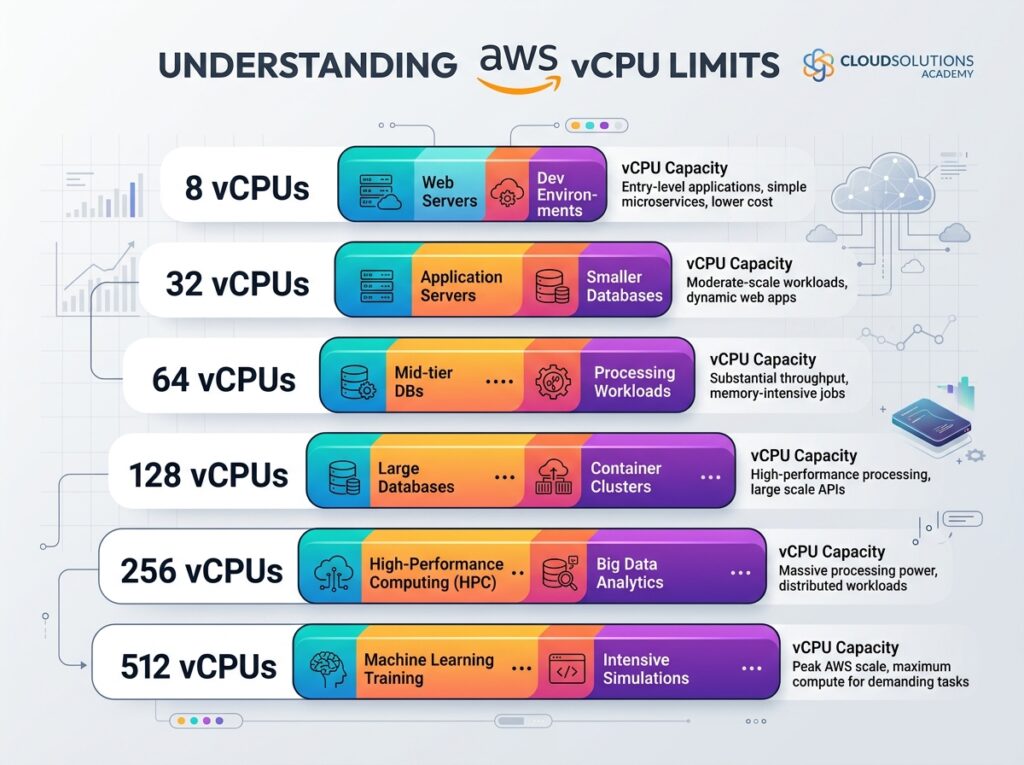
AWS enforces vCPU-based limits on EC2 On-Demand and Spot instances to prevent resource abuse and ensure fair infrastructure access. Default limits vary by instance family—typically starting at 32–64 vCPUs—and can be increased via AWS Service Quotas. Understanding these limits helps you plan deployments and avoid unexpected launch failures. Spinning up a new EC2 instance and getting a “limit exceeded” error is a frustrating experience—especially when you’re mid-deployment. AWS vCPU limits are one of the most commonly misunderstood constraints in the EC2 ecosystem, and hitting one at the wrong moment can halt a project entirely. AWS applies vCPU-based quotas to EC2 instances to protect infrastructure stability across its global user base. These limits are set per AWS account, per region, and per instance family. They apply to running On-Demand instances and, separately, to Spot instances. Knowing where your limits sit—and how to adjust them—can save you significant time and operational headaches. This post breaks down what vCPU limits mean in practice, how common thresholds like 8, 32, 64, 128, 256, and 512 vCPUs apply to real workloads, and what to do when default limits aren’t enough. What Are AWS vCPU Limits, and Why Does AWS Enforce Them? AWS measures EC2 instance quotas in vCPUs rather than instance counts. Each EC2 instance type maps to a specific number of vCPUs. For example, an m5.large uses 2 vCPUs, while an m5.24xlarge uses 96. Your account’s running limit caps the total vCPUs you can use at any given time within a specific instance family. AWS enforces these limits for two main reasons: Infrastructure protection: Preventing any single account from monopolizing regional capacity Fraud and abuse prevention: Detecting and limiting unusual provisioning patterns in new accounts Limits are scoped by instance family (e.g., Standard, High Memory, Accelerated Computing) and by purchase type (On-Demand vs. Spot). This means your On-Demand vCPU limit for Standard instances doesn’t affect your Spot instance quota for the same family. How Do the Common vCPU Thresholds Map to Real Workloads? 8 vCPUs: The smallest meaningful limit An 8-vCPU limit is uncommon in production but can appear in restricted sandbox accounts or specific service control policy (SCP) configurations in AWS Organizations. At 8 vCPUs, you can run: Four t3.large instances (2 vCPUs each) One m5.2xlarge instance (8 vCPUs) This limit suits basic testing environments but is too constrained for most production workloads. 32 vCPUs: The typical new account default Newly created AWS accounts in many regions start with a 32-vCPU On-Demand limit for Standard instance families. This is a deliberate constraint to limit exposure from potentially fraudulent accounts. With 32 vCPUs, you can run a modest web application stack—perhaps a few t3.xlarge or m5.xlarge instances—but you’ll hit the ceiling quickly when scaling horizontally or running compute-heavy tasks. 64 vCPUs: A common early-stage production limit After an account matures or after an initial quota increase request, many teams operate at 64 vCPUs. This accommodates: Small Kubernetes clusters using m5.2xlarge nodes (8 vCPUs each → 8 nodes) Mid-size data pipelines on c5.4xlarge instances (16 vCPUs each → 4 instances) For teams running CI/CD pipelines or staging environments alongside production, 64 vCPUs often becomes the first bottleneck. 128 vCPUs: Scaling into serious workloads At 128 vCPUs, you’re operating at a level that supports meaningful production traffic. This threshold is common for growing SaaS platforms, mid-sized analytics workloads, and container-based microservices architectures. A 128-vCPU limit gives you room to run: 16 instances of m5.2xlarge (8 vCPUs each) 8 instances of c5.4xlarge (16 vCPUs each) 4 instances of r5.8xlarge (32 vCPUs each) Reaching this limit typically requires a formal quota increase request through AWS Service Quotas. 256 vCPUs: High-throughput environments A 256-vCPU allocation is typical for teams running large-scale batch processing, machine learning training pipelines, or high-availability applications with significant redundancy built in. At this scale, instance selection strategy matters more. A team running c5.18xlarge instances (72 vCPUs each) will exhaust 256 vCPUs with just three or four running instances. Planning your instance mix carefully—and monitoring utilization with AWS CloudWatch—becomes essential. 512 vCPUs: Enterprise-scale capacity A 512-vCPU limit reflects an enterprise-grade deployment footprint. Teams at this level are typically running multi-region architectures, large Spark or EMR clusters, or GPU-accelerated workloads across multiple instance families. It’s worth noting that 512 vCPUs is a limit within a single instance family and region. Large organizations often request higher limits—sometimes in the thousands—through AWS account teams or via the Service Quotas console. How Can You Check Your Current vCPU Limits in AWS? You can view your current EC2 vCPU quotas in two ways: AWS Service Quotas Console: Navigate to Service Quotas → AWS Services → Amazon EC2. Search for “Running On-Demand” to see limits by instance family. AWS CLI: Run aws service-quotas list-service-quotas –service-code ec2 to retrieve current quota values programmatically. Limits are displayed per instance family (e.g., “Running On-Demand Standard (A, C, D, H, I, M, R, T, Z) instances”). The vCPU count shown is the maximum total vCPUs you can run simultaneously across all instances in that family within the selected region. How Do You Request a vCPU Limit Increase on AWS? Quota increases are handled through the AWS Service Quotas console or by submitting a support ticket. Here’s the standard process: Go to Service Quotas in the AWS Management Console Select Amazon EC2 Find the relevant quota (e.g., “Running On-Demand Standard instances”) Click Request quota increase Enter your desired limit and submit AWS typically reviews requests within 24–72 hours. For larger increases—particularly beyond 256 or 512 vCPUs—AWS may ask for business justification, expected usage patterns, and confirmation of your intended region. For time-sensitive situations, opening a support case via AWS Premium Support (if you have a Business or Enterprise support plan) can accelerate the review. What Happens If You Exceed Your vCPU Limit? When an instance launch request would exceed your vCPU quota, AWS returns a VcpuLimitExceeded error. The instance will not launch. Existing running instances are unaffected—AWS does not terminate instances to enforce a newly reduced limit. This error commonly surfaces during: Auto Scaling scale-out events
AWS vCPU Limits Explained: 8, 32, 64, 128, 256, and 512 vCPU Read More »