
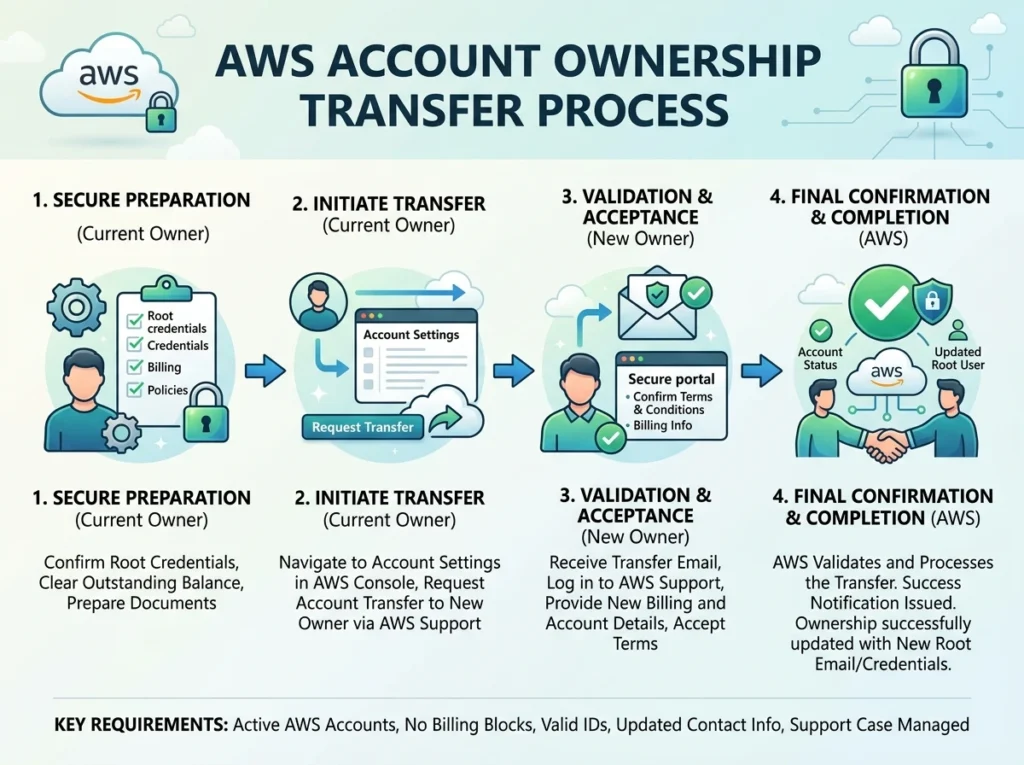
AWS does not support direct account ownership transfers. Instead, you transfer control by updating the root user email address and payment method to the new owner’s details. For organizations using AWS Organizations, additional steps are required to migrate or unlink member accounts before completing the handover.
Businesses change. Companies get acquired. Teams restructure. And when they do, AWS account ownership often needs to move with them.
The problem? AWS doesn’t have a simple “transfer ownership” button. Unlike transferring a domain name or handing over a social media account, AWS account ownership transfers require a deliberate, multi-step process—and skipping a step can leave the new owner locked out or the previous owner still financially liable.
This guide breaks down exactly how AWS account ownership transfer works, which account types are involved, and what steps to follow to make the handover clean and complete.
What Does “AWS Account Ownership” Actually Mean?
AWS account ownership is tied to the root user—the email address and credentials used to create the account. The root user has unrestricted access to all AWS services and billing settings, regardless of any IAM (Identity and Access Management) policies in place.
Transferring ownership, in practice, means transferring control of the root user. This involves:
- Changing the root user’s email address to the new owner’s email
- Updating the payment method to the new owner’s billing details
- Sharing or resetting the root user password securely
There is no formal “ownership transfer” workflow within the AWS Management Console. AWS treats the account as belonging to whoever controls the root email address.
Common Scenarios That Require an AWS Account Ownership Transfer
Understanding why transfers happen helps clarify the stakes involved. The most common scenarios include:
Mergers and acquisitions: When one company acquires another, AWS accounts tied to the acquired entity need to come under the acquiring company’s control—or be migrated entirely into a consolidated AWS Organization.
Organizational restructuring: Internal changes, such as a subsidiary becoming independent or a team spinning out into its own entity, often require accounts to be reassigned to new billing owners.
Contractor or agency handoffs: Agencies or freelancers who set up AWS accounts on behalf of clients will need to transfer root access before the engagement ends.
Personnel changes: When the employee who originally created an account leaves the organization, companies need to regain control of the root user credentials.
Each scenario carries its own complexity, but the core process remains the same.
A Quick Overview of AWS Account Types
Before walking through the transfer process, it helps to understand the two main AWS account structures you may be dealing with:
Standalone AWS accounts are independent accounts with their own billing, root credentials, and resource ownership. These are the simplest to transfer.
Member accounts within AWS Organizations are accounts that have been linked to a management (formerly “master”) account. These accounts consolidate billing and can be subject to Service Control Policies (SCPs). Transferring ownership of a member account is more complex—you’ll need to either remove it from the organization first or coordinate the transfer at the organization level.
How to Transfer AWS Account Ownership: Step by Step
Step 1: Confirm root user access
Before anything else, confirm that the current owner has active access to the root user email address. If that email account has been closed or is no longer accessible, you’ll need to go through AWS Support to regain access—a process that requires identity verification and can take time.
Step 2: Update the root user email address
Once root access is confirmed, log in to the AWS Management Console using root credentials and navigate to Account Settings. From there:
- Go to Account > Edit next to the email address field
- Enter the new owner’s email address
- Verify the change via the confirmation email sent to the new address
This step is the most critical. Once the email is updated and verified, the new owner controls the root account.
Step 3: Update the payment method
Navigate to Billing and Cost Management > Payment Methods and add the new owner’s payment information. Remove the previous owner’s credit card or bank details to ensure no future charges hit the wrong account.
This step is often overlooked—and it can result in the previous owner continuing to be billed for active resources.
Step 4: Reset the root user password
After updating the email, reset the root password so only the new owner holds the credentials. Use a strong, unique password and store it securely in a password manager.
Step 5: Review and update contact information
In Account Settings, update the account name, phone number, and address to reflect the new owner. AWS uses this information for verification and support purposes.
Step 6: Audit IAM users and permissions
Once ownership has transferred, the new owner should audit all existing IAM users, roles, and access keys. Remove any users tied to the previous owner’s organization, and ensure MFA (multi-factor authentication) is enabled on the root account.
Additional Considerations for AWS Organizations
If the account being transferred is a member of an AWS Organization, the process is more involved.
Option 1 – Remove the account from the organization first. The management account can remove a member account from the organization before the transfer takes place. Once removed, the account becomes standalone and can be transferred using the steps above. Note that removed accounts may need to add their own payment method before they can operate independently.
Option 2 – Transfer within the organization. If the new owner is taking control of the entire organization, update the management account’s root credentials. All member accounts will then fall under the new owner’s consolidated billing.
AWS documentation recommends working through AWS Support when dealing with complex organizational transfers, particularly those involving multiple accounts or cross-organization migrations.
What to Do After the Transfer Is Complete
A clean transfer doesn’t end with the root credential handover. The new owner should also:
- Enable AWS CloudTrail to log all account activity going forward
- Review active resources to avoid inheriting unexpected costs
- Check service limits and support plans, which are tied to the account
- Update any third-party integrations that used credentials from the previous owner
It’s also worth running a cost and usage report for the most recent billing period. This gives the new owner a clear baseline of current spending and helps identify any resources that should be terminated.
What Happens If You Lose Root Access?
Losing root access before completing a transfer is one of the most disruptive scenarios an AWS administrator can face. If the root email address is no longer accessible, AWS Support can assist with account recovery—but the process requires verifying account identity through billing records, registered phone numbers, and other verification steps.
To avoid this entirely, always confirm root access before initiating a transfer, and never rely solely on a single email account that could be deactivated.
Frequently Asked Questions
Can AWS transfer account ownership on my behalf?
No. AWS does not perform ownership transfers directly. Account ownership is controlled by whoever holds the root user credentials, so transfers must be completed by the account holder.
How long does an AWS account ownership transfer take?
The technical steps can be completed in under an hour, assuming root access is available and all parties are ready. Transfers involving AWS Organizations or account recovery through AWS Support can take longer—sometimes several business days.
Is there a fee for transferring an AWS account?
AWS does not charge a fee for updating account details or root credentials. However, any outstanding balance on the account remains the responsibility of the previous payment method until updated.
Can I transfer only some resources instead of the whole account?
Yes. If transferring the entire account isn’t practical, specific resources (such as S3 buckets, EC2 instances, or RDS databases) can be migrated to a different AWS account using services like AWS Resource Access Manager (RAM) or manual migration procedures.
What happens to existing IAM users during a transfer?
IAM users, roles, and policies remain in place after the root credentials are updated. The new owner should audit all IAM entities post-transfer and remove any users that should no longer have accessYou can also visit here : Buy AWS Account