
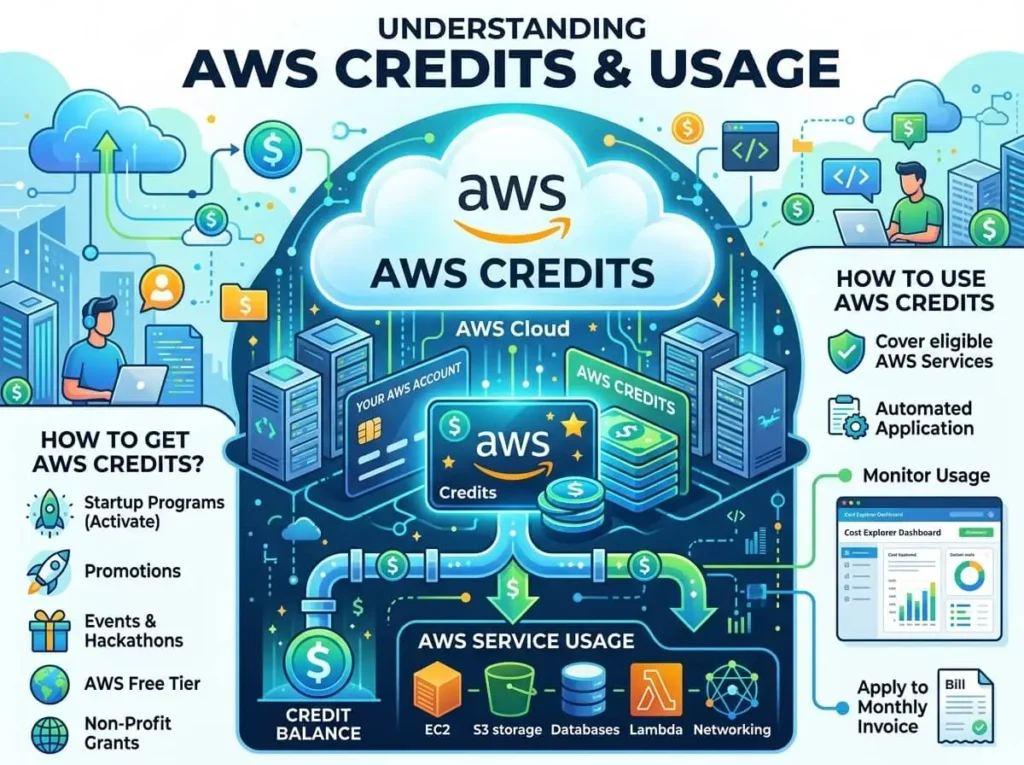
AWS Credits are promotional funds provided by Amazon Web Services that offset cloud service costs. They’re applied automatically to your monthly bill, covering eligible services like compute, storage, and databases. Startups, students, and researchers are among the most common recipients, often through programs like AWS Activate or AWS Educate.
Cloud costs can spiral fast. For startups burning through runway or developers prototyping a new application, that’s a real problem. AWS Credits exist to lower that barrier—giving teams the financial breathing room to explore, build, and scale on Amazon Web Services without the immediate pressure of a mounting bill.
But how exactly do they work? And how do you make sure you’re getting the most out of them before they expire? This guide breaks it all down.
What Are AWS Credits?
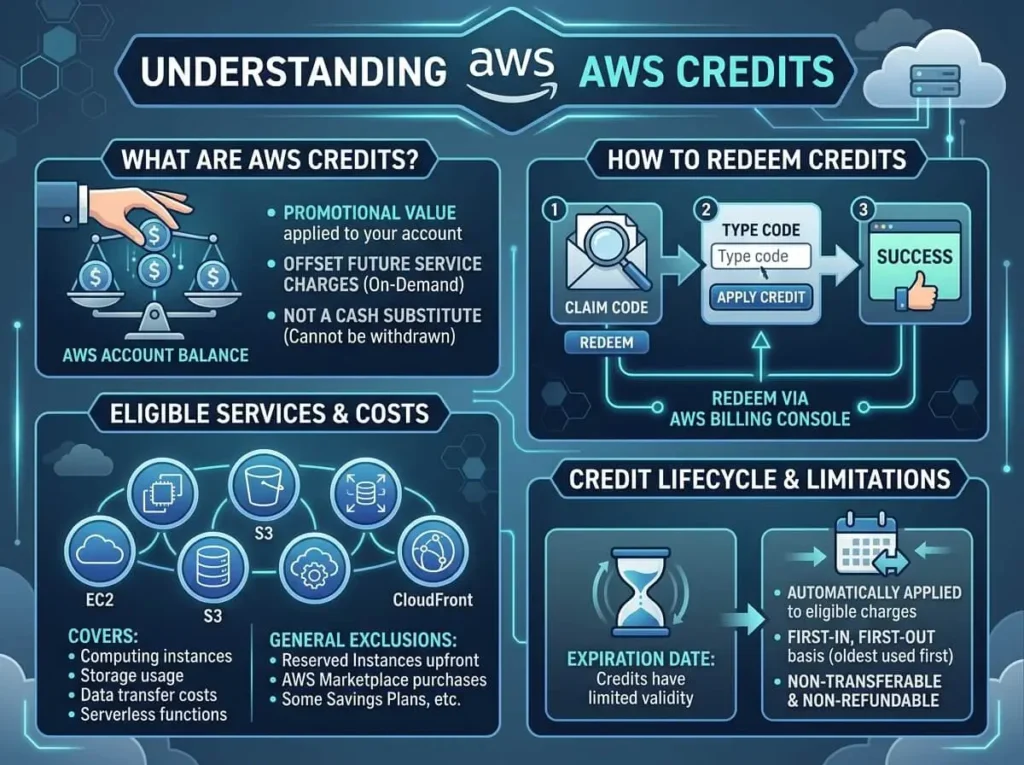
AWS Credits are promotional funds issued by Amazon Web Services that reduce the amount you owe on your AWS bill. Think of them as a prepaid balance—applied automatically each billing cycle to offset the cost of eligible AWS services.
Amazon distributes credits through several programs, each targeting a different audience:
- AWS Activate Credits are designed for startups. Through the Activate program, early-stage companies can receive anywhere from $1,000 to $100,000 in credits, depending on their tier and accelerator partnerships.
- AWS Educate Credits are available to students and educators exploring cloud computing. These credits are typically smaller in value but provide meaningful access to AWS tools in an academic context.
- AWS Research Credits support academic institutions and researchers running compute-intensive workloads.
- Promotional Credits are occasionally distributed through AWS partner events, marketing campaigns, or directly from AWS account representatives.
Eligibility varies by program. Startups applying through AWS Activate must typically be associated with a recognized accelerator, incubator, or VC firm. Educational credits require a valid institutional email address. Promotional credits are often awarded on a case-by-case basis.
How Do AWS Credits Work?
How Are Credits Applied to Your AWS Bill?
Once credits are added to your account, they’re applied automatically during billing. You don’t need to enter a code each month or manually trigger anything—AWS handles the deduction on your behalf.
Credits are applied after your free tier usage but before your payment method is charged. So if your monthly bill comes to $500 and you have $300 in credits, you’ll only be charged $200 to your credit card or bank account.
What Is the Priority Order for Credit Usage?
AWS applies credits in a specific order based on expiration date and service restrictions. Credits that expire soonest are used first. If a credit is restricted to specific services (like Amazon EC2 or Amazon S3), it will only apply to charges from those services—general credits cover a broader range.
This matters because unused credits don’t roll over indefinitely. Credits that aren’t applied before their expiration date are forfeited, regardless of your account balance.
How Long Do AWS Credits Last?
Expiration timelines vary by program. AWS Activate credits typically expire after one to two years from the date they’re issued. Promotional credits may have shorter windows—sometimes as little as 30 to 90 days. AWS will notify you via email before your credits expire, but it’s worth monitoring your balance proactively rather than relying solely on those alerts.
How Can You Track Your AWS Credit Balance?
You can view your credit balance at any time through the AWS Billing Dashboard. Navigate to Billing > Credits to see a breakdown of available credits, their expiration dates, and any service restrictions. AWS Cost Explorer also provides detailed visibility into how credits are being consumed alongside your other charges.
What Are the Benefits of Using AWS Credits?
Reducing Cloud Costs for Startups and New Users
The most immediate benefit is straightforward: credits cut costs. For a startup that’s pre-revenue or in early product development, AWS Credits can mean the difference between a manageable infrastructure bill and one that forces difficult tradeoffs.
AWS Activate, in particular, is structured to give startups real runway. The top-tier Activate Portfolio program provides up to $100,000 in credits, along with technical support and training resources—a significant advantage for teams building on AWS from day one.
Risk-Free Experimentation With AWS Services
Credits make it easier to experiment. Want to test Amazon SageMaker for a machine learning prototype, or spin up an Aurora database cluster to evaluate performance? With credits covering the cost, you can explore services that would otherwise feel financially risky for a small team or individual developer.
This experimentation has compounding value. Teams that understand AWS services deeply tend to architect more efficiently—which pays dividends long after the credits run out.
Access to Enterprise-Grade Infrastructure Without Upfront Investment
AWS offers services that enterprise organizations pay significant sums to access. Credits give smaller organizations—startups, nonprofits, research institutions—the ability to use that same infrastructure without a proportional financial commitment. That levels the playing field considerably.
What Are the Limitations of AWS Credits?
Credits aren’t a free pass for everything on AWS. There are meaningful restrictions worth understanding before you build your cost strategy around them.
Which AWS Services Are Not Covered by Credits?
Not all AWS services are eligible. Marketplace purchases (third-party software sold through AWS Marketplace) are typically excluded. AWS Support plans, domain registrations through Route 53, and certain reserved instance purchases may also fall outside credit coverage. Always check the terms associated with your specific credit type.
Do AWS Credits Have Regional Restrictions?
Some credits are restricted to specific AWS regions. If you’re running workloads in a region that isn’t covered by your credit terms, those charges will flow directly to your payment method. Review your credit terms carefully if your architecture spans multiple regions.
What Happens When AWS Credits Expire?
Expired credits are gone—there’s no reinstatement process. Once a credit’s expiration date passes, any unused balance is forfeited. This makes proactive planning essential, particularly for organizations that receive large one-time credit grants and need to scale usage accordingly.
How Can You Maximize the Value of AWS Credits?
Plan Your Resource Allocation Around Your Credit Timeline
Start by mapping your credit expiration date against your development or product roadmap. If you have 12 months of credits, use the early months for experimentation and architecture decisions, then accelerate workloads in the back half to fully utilize your balance before it expires.
Avoid the common mistake of hoarding credits “for later.” Later often arrives faster than expected—and credits that expire unused are pure waste.
Monitor Usage Weekly, Not Monthly
Checking your billing dashboard once a month isn’t enough when credits are involved. Weekly reviews give you the visibility to catch unexpected charges early, identify services consuming more than anticipated, and adjust before costs exceed your credit balance.
AWS Budgets is a useful tool here. You can set custom alerts that notify you when your credit consumption or total spend crosses a defined threshold.
Avoid Zombie Resources
One of the most common credit drains is forgotten infrastructure—test environments, idle EC2 instances, or development databases left running after a project wraps up. These “zombie resources” quietly consume credits (and then real money) without delivering any value.
Build a habit of resource cleanup into your workflow. AWS Trusted Advisor and AWS Cost Explorer can help identify underutilized resources that are worth shutting down.
Combine Credits With Reserved Instances Strategically
If you’re approaching the end of your credit period and anticipate continued AWS usage, consider purchasing Reserved Instances for workloads you’re confident about. Credits can sometimes apply toward reserved instance charges, effectively extending their value while locking in lower long-term pricing.
Make Your Credits Work Harder
AWS Credits are a genuine advantage—but only if you treat them as a strategic resource rather than a passive benefit. Understanding how credits are allocated, applied, and restricted puts you in a position to build smarter, experiment more freely, and scale without unnecessary financial risk.
Whether you’re a startup navigating AWS Activate or a developer making use of promotional credits, the principles are the same: track your balance, plan your workloads, and clean up what you don’t need.
Frequently Asked Questions About AWS Credits
What are AWS Credits used for?
AWS Credits are used to offset the cost of eligible Amazon Web Services, such as compute (EC2), storage (S3), and databases (RDS). They’re applied automatically to your monthly bill before any payment method is charged.
How do I get AWS Credits as a startup?
Startups can apply for AWS Credits through the AWS Activate program. Eligibility typically requires an affiliation with a recognized accelerator, incubator, or venture capital firm. Credits range from $1,000 to $100,000 depending on the program tier.
Do AWS Credits expire?
Yes. AWS Credits have expiration dates that vary by program. Credits from AWS Activate typically expire within one to two years. Promotional credits may expire within 30 to 90 days. Expired credits cannot be reinstated.
Can AWS Credits be transferred between accounts?
No. AWS Credits are tied to the specific account they were issued to and cannot be transferred to another AWS account.
What happens if my AWS charges exceed my credit balance?
Any charges that exceed your credit balance are billed to your default payment method. AWS applies credits first, then charges the remainder to your credit card or bank account.
Are all AWS services covered by credits?
No. AWS Marketplace purchases, Support plans, and certain other charges are typically excluded from credit coverage. Always review the terms of your specific credit grant to understand which services are eligible.
You can also visit our website : Buy AWS Accounts